
Dashboard
The web dashboard is the easiest way to configure La Cabra. It allows you to change all settings visually without needing any technical knowledge. It is the most convenient option for mobile devices.
La Cabra has two main ways it can be configured: via the web dashboard or via a configuration file.
Dashboard
The web dashboard is the easiest way to configure La Cabra. It allows you to change all settings visually without needing any technical knowledge. It is the most convenient option for mobile devices.
YAML File
The configuration file is a YAML file containing all of La Cabra’s settings. It allows for a more advanced and detailed configuration, but requires technical knowledge to edit.
Both options offer the same flexibility and configuration options, so choosing one or the other is purely personal. However, we strongly recommend sticking to your chosen method, as they are not compatible with each other; once you change a setting in the dashboard, the configuration file becomes outdated. Below, important concepts about both methods are explained.
You can access the La Cabra dashboard by clicking the following button:
DashboardUsing it is very simple, as most settings are self-explanatory. However, if any setting is unclear, it is most likely explained in this documentation.
When you select the server you want to configure, a panel like the one shown in the image will appear.
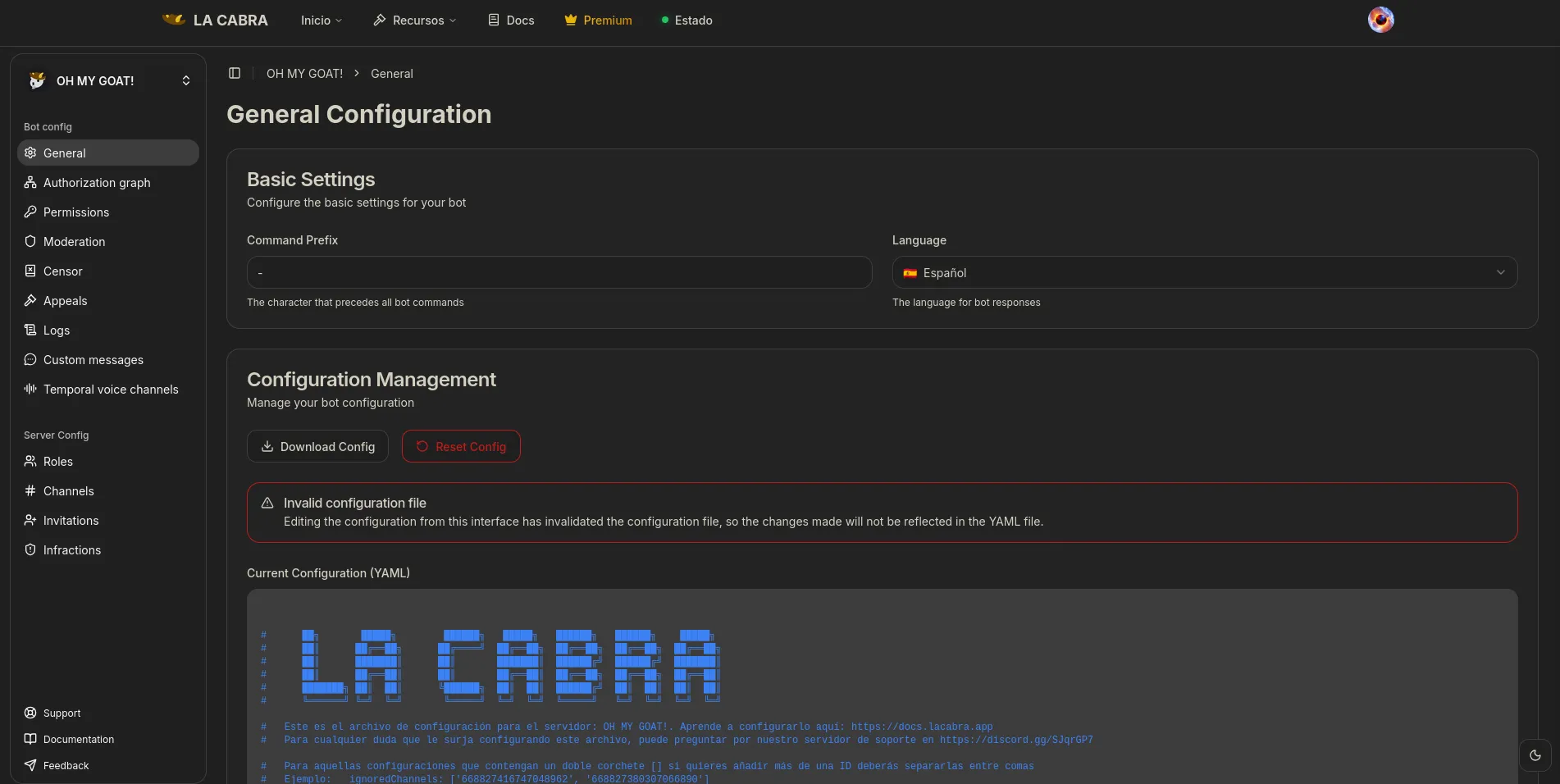
On the left column are the different modules of La Cabra, and clicking on one will display the available settings for that module. When changing any setting, a button to save the changes will appear at the bottom. It is important to click that button for the changes to apply.
A configuration file is a YAML file containing all of La Cabra’s settings. It allows you to save backups of your configuration and can be faster to configure if you have experience with these types of files. However, it is easier to make mistakes when editing it, so it is recommended to use the dashboard if you lack experience. To edit it, you can use a text editor with YAML syntax highlighting, such as Visual Studio Code, or an online tool like https://onlineyamltools.com/edit-yaml.
La Cabra’s configuration is a YAML format file; the file’s name is your server’s ID. This is a very basic configuration example:
prefix: '/'commands: 'ban': 20 'borrar': 10 'clear': 10The bot is divided into modules, which you need to declare in the configuration for them to work. Each of these modules are those listed in the different sections of this documentation.
If you decide to configure La Cabra via the configuration file, you can get your server’s configuration with the /exportar command if you are the owner,
or via the /iniciar command if you are an administrator. When you get your configuration file, it will look something like this, but more extensive:
lang: 'es-ES'      # The bot's language, default is 'es-ES' (Spanish from Spain), you can view the available languages at https://docs.lacabra.app/langsprefix: '-'        # The prefix for the bot's commands (per message), default is '-' (you can change it as you like)
authorizations:    '163405286722371584': 100
# ... ( rest of the configurations )